Bulk Uploading Images
You can upload up to 1,000 images at once, either to create new items or to add photos to items you already have. Each image can be up to 20 MB.
Getting Started
Go to your Inventory List, click on the down caret button next to "New Item" and select Upload Images from the dropdown menu:
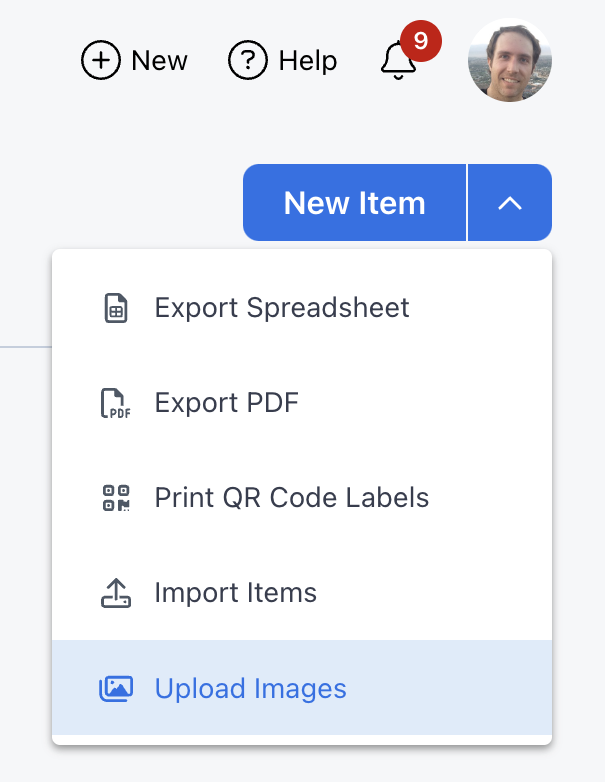
Then choose how you want to upload images:
- Create one new item for each image: see Use when adding new items in bulk.
- Update existing items by adding images: see Adding images to existing items below.
Adding Images to Existing Items
Propcart matches each image to an item by its filename, which must start with the item's SKU. Uppercase and lowercase letters are treated the same, so abc123.jpg is attached to the item with SKU ABC123.
New images are added after the item's existing photos. An item can have up to 20 photos. Images that would take an item over 20 aren't uploaded, and they're listed with "Photo limit exceeded".
Naming more than one image per item
Add a letter right after the SKU:
ABC123a.jpg
ABC123b.jpg
ABC123c.jpg
Images are added in the alphabetical order of their filenames. A file named with only the SKU (ABC123.jpg) comes before ABC123a.jpg, so you can use it for the main photo.
If you'd rather use numbers, separate them from the SKU with a hyphen and add a leading zero:
ABC123-01.jpg
ABC123-02.jpg
...
ABC123-10.jpg
Filenames are sorted as text, not as numbers, so without the leading zero ABC123-10.jpg comes before ABC123-2.jpg. Without the hyphen, ABC1232.jpg could be read as the SKU ABC1232, which may be another item.
Don't put a space or period after the SKU. Everything after the first space or period in a filename is ignored, so ABC123 a.jpg and ABC123 b.jpg are both read as ABC123, and only one of them is uploaded.
How images are matched to SKUs
Propcart attaches each image to the longest SKU that its filename starts with. For ABC123b.jpg, it looks for ABC123B, then ABC123, then ABC12 and so on, and stops at the first SKU that exists.
This means:
- Pick a suffix that can't spell another one of your SKUs. If you have items with both
ABC123andABC123Bas SKUs,ABC123b.jpgis attached toABC123B. If your SKUs end in letters, use the hyphen and number pattern instead. - A typo can attach an image to the wrong item. If
ABC1234doesn't exist butABC123does,ABC1234a.jpgis attached toABC123.
Check the matches before uploading
After you drop your images in, Propcart lists each item with its SKU and the images that will be added to it. Images that don't match any SKU are listed with "No matching SKU".
Check that each image is listed under the right SKU, then click the blue Upload X Images button.