Creating an Account
Accounts were formerly called "Productions"

A new Account only requires a unique name to be created.
Once created, you can add the following information:
Ways to Create
You can create an account four ways:
From the Accounts List
Select the blue New Account button at the top right of the Accounts page.
From a Company
Select the blue New Account button on the middle right of the Company page.
From an Account Application
Select the blue Convert to Account button at the top right of the Account Application page.
From an Order
First, enable this toggle in your Order Settings: Can Accounts be created within an Order?

Within an order, you can create a new account in the "Account" field:
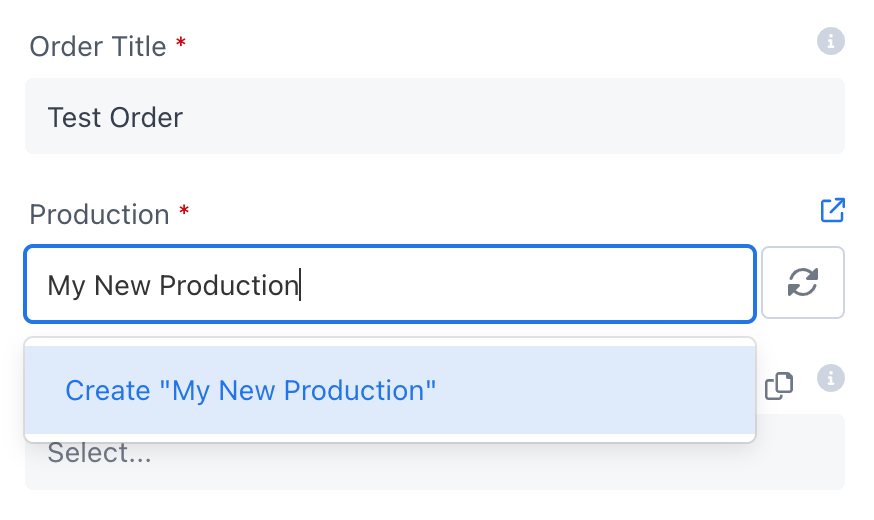
Type in the new Account name and then click the Create {{new account name}} menu option. A new account will be automatically created with that name and associated with this order.
Frequently Asked Questions
Creating an account can be tricky at first, so we want to address some common questions.
Is the Account the job or the production company?
Sometimes you'll want to make the production company the Account. Other times you'll want to make it the job/project. How do you decide?
Omit the Company and use the production company as the Account when:
- The job is small like a photoshoot, commercial, or event
- The production team (contacts) stays the same across multiple jobs, especially the buyers and accounts payable person
- The customer wants to use the same COI and/or rental agreement for multiple jobs
Setting up a new Account takes work, so if the conditions above are met, you can save time by reusing the same Account across multiple jobs/projects and then giving each order a title using the format:
Job name: Set name
Note the colon separating the job name from the set name.
Use the production company as the Company and the project as the Account when:
- The production company is a major studio like Netflix or Warner Bros. and you want to group all of their accounts together
- The project is large like a season of a TV show or feature film
- The project has its own business entity (usually for large projects like TV shows or features)
- A unique team was hired for this project and will be disbanded when the project ends
- You want new accounts to inherit addresses, billing info, contacts, and documents from a single production company
What if a project has multiple production companies?
You can either:
- Choose a primary production company and make that the Account's
Company. You can then add the other production companies to the Account'sAddressor thePrivate Notesfor reference. - Omit the Company and add all production companies to the Account
Address.
An order cannot be created without an Account; the Account must be created first.
What if you don't have the account info yet and need to send a buyer a quote ASAP?
Create an Account called "New Account Pending" and start a new Order under that Account to generate your quote. When the account info arrives later, create a new Account then assign the Order to it.
What if a new customer just wants to buy something for $5? Isn't setting up an entire account overkill?
Yes, it is. Create an Account called "Misc Jobs" and create your small orders under that.
Many prop houses have a minimum order size of $50-$100 to avoid small orders that aren't worth the trouble.